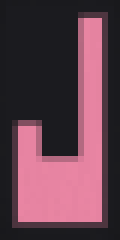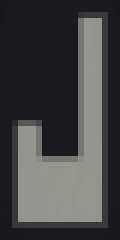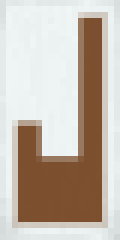
What you need
- Black Wool6for the blank banner
- Stick1for the blank banner
- Yellow Dye3one per layer
- Black Dye2one per layer
Layer order
| # | Pattern | Dye | ID |
|---|---|---|---|
| 1 | Pale Dexter | Yellow | stripe_left |
| 2 | Per Fess | Black | half_horizontal |
| 3 | Base | Yellow | stripe_bottom |
| 4 | Pale Sinister | Yellow | stripe_right |
| 5 | Bordure | Black | border |
Craft a black banner
Put six black wool in the top two rows of a crafting table and one stick in the bottom middle slot. This blank banner is the base of the design.

Add Pale Dexter in yellow
Place the banner in a loom with one yellow dye and pick the Pale Dexter pattern (id stripe_left).

Add Per Fess in black
Place the banner in a loom with one black dye and pick the Per Fess pattern (id half_horizontal).

Add Base in yellow
Place the banner in a loom with one yellow dye and pick the Base pattern (id stripe_bottom).

Add Pale Sinister in yellow
Place the banner in a loom with one yellow dye and pick the Pale Sinister pattern (id stripe_right).

Add Bordure in black
Place the banner in a loom with one black dye and pick the Bordure pattern (id border).

Give command
In a world with cheats on, paste one of these to get the finished banner.
/give @p minecraft:black_banner[minecraft:banner_patterns=[{pattern:"minecraft:stripe_left",color:"yellow"},{pattern:"minecraft:half_horizontal",color:"black"},{pattern:"minecraft:stripe_bottom",color:"yellow"},{pattern:"minecraft:stripe_right",color:"yellow"},{pattern:"minecraft:border",color:"black"}]]/give @p minecraft:black_banner{BlockEntityTag:{Patterns:[{Pattern:"ls",Color:4},{Pattern:"hh",Color:15},{Pattern:"bs",Color:4},{Pattern:"rs",Color:4},{Pattern:"bo",Color:15}]}}Put it on a shield
In Java Edition, place the finished banner next to a shield in a crafting grid to copy the design onto the shield. The banner is used up. Bedrock Edition does not support banners on shields.